
Maximize Your Workspace: Key Tools & Apps for Success
Transform your home office with our expert advice on layout, apps, and essential tools. Boost your productivity with these tried-and-tested strategies.
Mar 24, 2016
5 min read
Updated Jul 10, 2024
I recently visited a friend who was setting up their home office and I was giving them some recommendations of what they needed to get set up right away. Between layout, apps, chrome extensions, and online services – I’ve tried everything (I nerd out on this stuff) and have found the diamonds in the rough.
Before we get to tools, you must have a good layout for your office. I recently did a quick study of some Feng Shui tips so I could improve the layout of my office. Here’s what I learned:
Before:
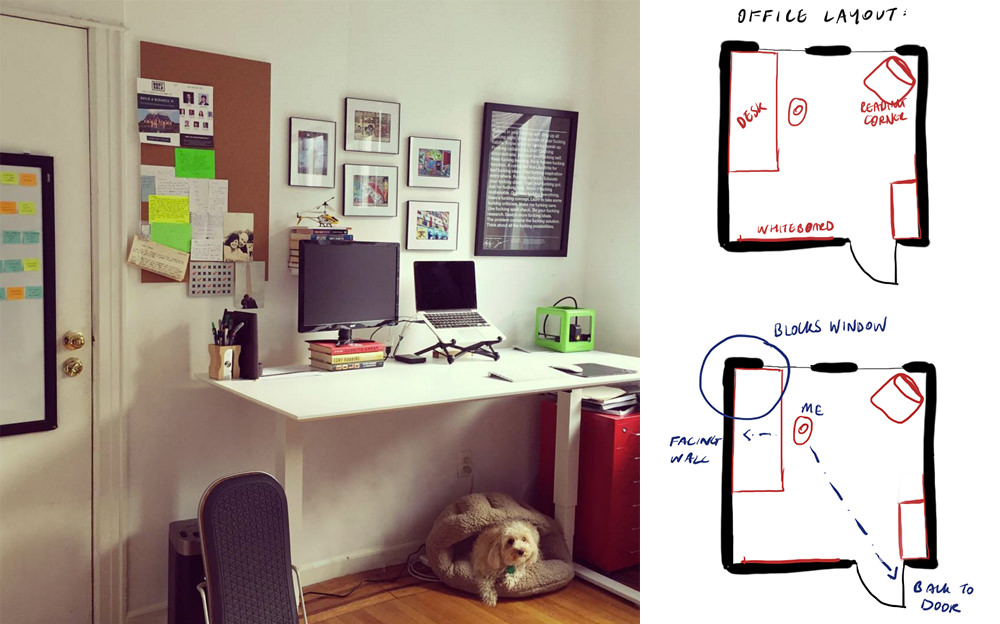
A few things I learned were an issue right away:
- My back was facing the door (in a horror movie this would mean I’d be attacked first)
- I was facing a wall on two sides which meant I was boxed in and not fully using desk space
- My back was to the windows which meant for videos my face was always in darkness
After:
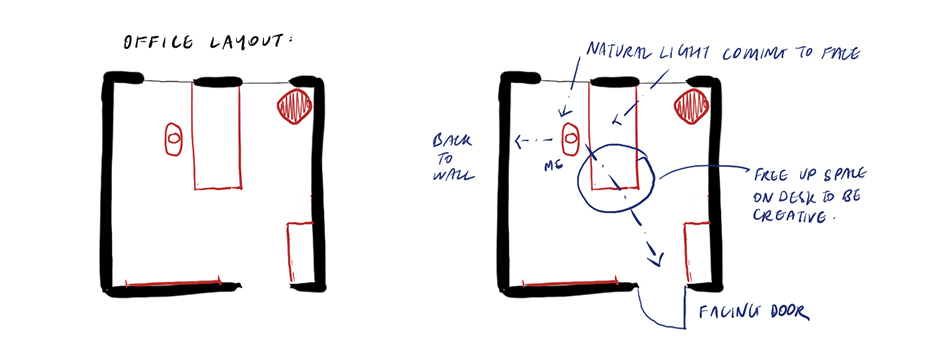
Improvements:
- Now I have my back to the wall which symbolically gives me support
- I am facing the door, which for a home office matters as business comes to you through the door so we don’t want to turn our back on it.
- I have natural light at my face now rather than my back which helps throughout the day when I do video calls with my team
- I’ve freed up space at the end of my desk that I can use creatively.
(did I mention I used to be an architect… hence the drawings)
A video posted by Cathryn Lavery (@cathryn_lavery) on Mar 13, 2016, at 8:19 am PDT
Alright now you know a few tips on how to layout your space better, let’s get onto all the tools, apps, and gadgets I use to stay productive and run multiple businesses.
Workspace Tools:
When you optimize you start with the things you use every day so you can start improving the tasks that will make the biggest difference. I use a Macbook Pro 13″ Retina laptop, fully loaded and these tools to optimize my workspace:
Roost Stand – Transforms your laptop into an ergonomic desktop workstation. It’s height Adjustable and Portable, I bring mine everywhere.
SELF Journal – My daily journal
Apple Time Capsule – WiFi base station and a no-hassle backup solution
Humanscale Float Table – This is the desk I use, it’s BIG at 72″ W x 30″ D. It’s height adjustable, however, I use it as a standing desk for 80% of the time.
Anti-Fatigue Floor Mat – Makes working at my standing desk much more comfortable.
Computer apps:
Alfred – Will put your Mac on steroids. I save WEEKS of my life because of this app with all the built-in shortcuts and workflows.
aText – Text expander I use to create shortcuts for things I type regularly. Huge timesaver!
ByWord – This is what I write every article in (yes including this one).
Evernote – External brain for files, notes, and images. Syncs across devices.
F.Lux – Adjusts your display’s color temp, according to location & time of day
LastPass – Password manager, can create shared password folders
Skitch – I use this every day for screenshots and mockups. It’s the quickest and easiest way to relay ideas to virtual team members.
Slack – A messaging app for teams, Allen and I live on this with BestSelf.
ScreenFlow – For screen recordings and video editing
Sunrise – Awesome calendar app, the ‘Meet’ features make booking meetings seamless (no longer available)
RescueTime – Stay accountable for your time; the app runs in the background and tracks your productivity
Transmission – The best way to download torrent files
VLC – The best way to watch movies on your computer
Chrome Extensions:
Momentum – Nice clean web dashboard
What Font – Ever seen a cool font on a website and wondered what it was? Think no more, this extension will tell you.
ListGoal – Real-time email statistics dashboard
News Feed Eradicator – Procrastination killer. Removes your FB newsfeed. Install it.
The Great Suspender – Saves computer power by turning off tabs you haven’t used in a while
ColorZilla – Choose any specific color from a screen
Online Services:
ConvertKit – Powerful email marketing. I use it for LittleMight and CalmTheHam emails (get 1st Month Free if you use this link )
WP Engine – WordPress hosting. It’s fast, secure, and has amazing customer service.
WP Curve – Never deal with a WordPress headache again… seriously love this.
Dropbox – Save files and access them anywhere. This has saved my ass a few times 🙂
Grammarly – Makes writing easier by keeping your spelling & grammar in check.
Marketers Delight – Excellent WordPress blog theme (Though I’m no longer using it).
Shoeboxed – Scan, track, and organize receipts. Makes tax time a breeze.
Shopify – Set up a store within mere hours. I use it on both BestSelf.co and Calm The Ham.
What other tools make your life better? I’d love to know what I’m missing out on.

Written by
Cathryn Lavery
Cathryn built and sold BestSelf, bought it back from private equity, and still runs it. She writes Little Might so she doesn't have to keep these lessons in her head.
Related reading
-
Apr 20, 2024
How to Turn ChatGPT into Your 24/7 Personal Intern
-
Apr 18, 2024
How to Create SOPs 100x Faster with ChatGPT & Loom
-
Jun 24, 2021
How to Design Your Environment for Productivity
-
Jun 17, 2021
How To Avoid "Decision Fatigue" | Productivity Hack
-
May 27, 2021
Never Procrastinate Again | My 20 Minute Rule